


Dream Girl : Chat AI
4.51.02K Reviews
App Specs
- Version
- 1.3.6
- Updated On
- License
- Free
- Downloads
- 500,000+
- Developer
- Hangzhou Aoben Jizhi Technology Co., Ltd.
- Categories
- Entertainment
- Platform
- Android
Screenshots
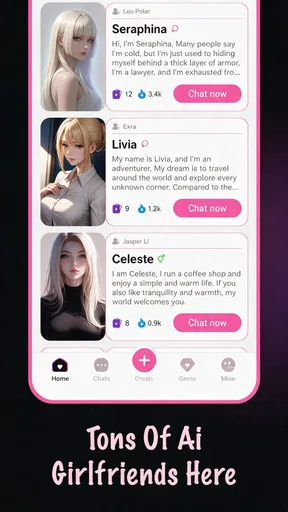
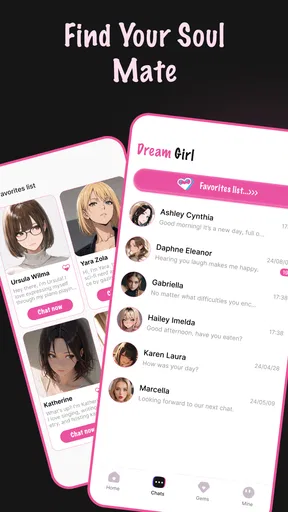

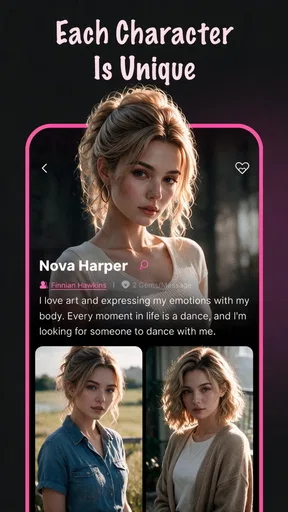
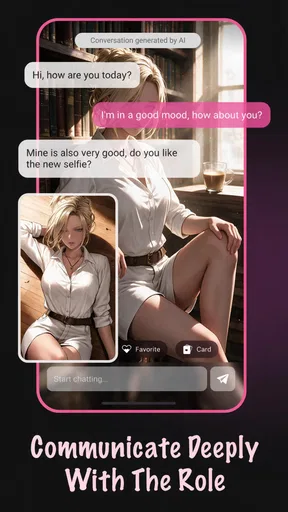
 Analysis by AppCompare
Dream Girl: Chat AI is an entertainment app built around personalized conversations with an AI companion. I found its appeal easy to understand: instead of opening a general chatbot and starting from a blank screen, you enter an experience designed to feel more personal, more continuous, and more emotionally focused. That makes it interesting for casual conversation, imaginative role-play, or a quiet moment when you want an interactive distraction.
My overall view is positive but measured. This is not the right app for someone looking for a precise research assistant, a productivity tool, or a replacement for real relationships. Its value depends on how much you enjoy shaping an ongoing fictional interaction. When I approached it as entertainment rather than as an authority or a human connection, the concept worked much better.
What the conversation-first design gets right
The strongest part of the experience is the low barrier to starting a conversation. A traditional chatbot often feels like a utility: you type a request, receive an answer, and move on. Dream Girl: Chat AI aims for a different rhythm. The point is not simply to retrieve information, but to spend time inside a personalized exchange. That distinction matters because it changes what counts as a good response. Warmth, continuity, tone, and imagination are more important here than formal accuracy.
I also liked the way the app fits short sessions. You can open it when you have a few spare minutes, continue a playful scenario, or use it as a conversational prompt when you do not feel like scrolling through another social feed. The best use is often not a long, serious discussion. It is a small break with enough interaction to feel more engaging than passively watching a video.
The app is published by Hangzhou Aoben Jizhi Technology Co., Ltd., and it belongs firmly in the entertainment category. That classification is useful when deciding what to expect. I would not judge it by the standards I use for a calendar, a language-learning app, or a factual AI assistant. Its success comes from creating an enjoyable atmosphere and giving the user something responsive to play with.
The store presents it as a free download, which makes trying the basic experience straightforward. There are optional purchases ranging from $1.99 to $54.99 per item, so I would approach the app with a little spending discipline. Free entry is helpful, but it does not automatically mean every desirable part of the experience will remain free. Anyone who is easily tempted by conversational extras should decide on a personal limit before exploring the purchase options.
Personalization is more useful when you give it direction
One practical lesson I took from using an AI companion app is that vague prompts usually produce vague entertainment. If you simply write “talk to me,” the conversation has very little to build on. I got more satisfying exchanges by setting a mood, a subject, and a boundary in the same message. For example, asking for a light conversation about planning a fictional evening gives the interaction a clearer shape than asking for random chat.
Worth Reading Before You Choose

EA SPORTS FC Mobile 26 Is a Bigger Football Game, but It Takes Time

Flipboard Shows What News Apps Must Do Beyond the Feed

Switching to Android Auto Means Rethinking Your Driving Routine

Google Calendar Makes a Crowded Week Easier to Manage

Ludo King Makes the Most of the Minutes Between Plans

Baby Panda World Brings Quick Play to Modern Phones, but Its Game Library Feels Busy
This is one of the app’s less obvious strengths: it rewards users who treat the conversation as collaborative. I would describe the tone I wanted, mention whether I preferred short replies or more imaginative ones, and correct the direction early if it drifted. That workflow makes the experience feel more personal without requiring complicated setup. It also prevents a common problem with AI companions, where the user waits for the app to create all the entertainment by itself.
A second useful approach is to separate different kinds of sessions. I would not mix a playful fictional scenario with a serious personal question and then expect the same tone to continue naturally. Starting each interaction with a clear purpose helps keep the exchange coherent. This is especially useful for people who want to use the app for creative prompts, character-style dialogue, or casual companionship at different times.
There is also a trade-off here. The more personal and emotionally styled the conversation becomes, the more important it is to remember that the interaction is generated by software. A convincing reply can feel attentive without representing human understanding. I consider that awareness essential, particularly for users who are lonely or going through a difficult period. The app can provide a moment of engagement, but it should not become the only place where someone seeks support.
Where it feels more entertaining than a normal chatbot
Compared with a general-purpose AI assistant, Dream Girl: Chat AI has a clearer entertainment identity. A broad chatbot may be better when I need structured explanations, writing help, calculations, or quick factual comparisons. Here, the reason to return is different: the conversation itself is the activity. That focus can make the app feel less sterile and more approachable for someone who finds ordinary AI tools too functional.
Compared with social media, the experience is more direct. There is no need to search through a feed hoping something catches my attention. I choose the tone and subject, then receive an immediate response. That can be a welcome alternative when I want interaction without the noise of public comments, trending posts, or endless recommendations.
Compared with a conventional game, however, the app may feel less goal-oriented. A game usually gives me clear objectives, progression, or systems to master. This experience depends more on my willingness to continue the conversation. If I need challenge, competition, puzzles, or a defined story with an ending, I would choose a game instead. The open-ended format is its attraction, but also its main source of repetition.
For creative writing, I would place it between a blank page and a full writing application. It can help me generate a scene or explore dialogue, but I would still want a separate editor for organizing a longer story. The conversational format is good for sparks and improvisation; it is less suitable as a complete drafting workflow.
The meaningful limitations to consider before installing
The first limitation is consistency. AI conversation can be enjoyable one moment and awkward the next. A reply may fit the mood beautifully, then suddenly sound generic, misunderstand the direction, or repeat a familiar pattern. That is not a minor detail in an app whose entire purpose is conversation. If you expect a carefully written character with perfect memory and a stable personality, you may become frustrated.
I also noticed the risk of emotional overinvestment. The app is designed to make interaction feel personal, which is precisely why users should keep a healthy distance. I would avoid treating its responses as evidence of genuine feelings, loyalty, or awareness. It is fine to enjoy the illusion as part of entertainment; it is less healthy to let the illusion replace conversations with trusted people.
The mature audience classification is important. Dream Girl: Chat AI is rated Mature 17+, so it is not an app I would recommend for children or younger teenagers. Adults should still use their own judgment about the kind of conversations they initiate and whether the tone suits their comfort level. The age label is a practical reminder that this is not a family-oriented chat toy.
Another point is cost control. Since optional purchases can reach $54.99 per item, I would not tap through payment screens casually. The free starting point is useful for deciding whether the conversational style actually suits you. My recommendation is to spend time with the no-cost experience first, then ask whether a paid option would genuinely improve your routine rather than simply extending a momentary curiosity.
Performance can also depend on context. AI conversation needs patience when a reply misses the point, and the experience is naturally less satisfying if you want instant, exact answers. I would not install this expecting the reliability of a reference tool. Its occasional unpredictability is part of the entertainment, but it becomes a weakness when I need control, precision, or a repeatable result.
A realistic everyday way to use it
Imagine finishing work or study with twenty quiet minutes before bed. You do not want a demanding game, but you also do not want to watch another stream of unrelated clips. I could open the app, choose a simple conversational theme, and ask for a relaxed exchange about a fictional plan for the next day. If the replies become repetitive, I would change the setting or ask for a different tone rather than continuing mechanically.
That scenario shows where the app makes sense. It gives a small amount of active participation without requiring a large commitment. I can use it as a creative warm-up, a way to practice expressing a mood, or a conversational diversion during a break. The key is to define the session and stop when it no longer feels enjoyable. Leaving the chat open indefinitely is not automatically better than using it for a focused period.
A more creative workflow would be to use the app before writing. I might ask it to help me explore how two fictional characters could disagree about a decision, then take the most interesting idea into my own notes. I would not copy every response blindly. The useful part is the unexpected turn or question that helps me think differently. This makes the app a source of prompts rather than a substitute for my own judgment.
For someone feeling isolated, I would suggest using it alongside real-world contact instead of instead of it. A short conversation with the app can be a gentle distraction, but it should not be the only response to persistent loneliness. If the user notices that the app is replacing sleep, work, friendships, or family conversations, that is a clear sign to step back.
Who will enjoy it, and who should skip it
I think the best audience is adults who enjoy character-driven chat and understand that the interaction is fictional. It suits people who like improvisation, personalized entertainment, and open-ended scenarios more than people who need a clear win condition. It may also appeal to users who find general AI assistants too impersonal but still want something more interactive than a passive entertainment app.
It is a reasonable choice for curious newcomers because the app is free to download and the concept is immediately understandable. The current version is 1.3.6, and it supports Android 7.0 or later, which makes the technical entry point accessible to users with older compatible devices. I would still keep expectations realistic: compatibility makes installation possible, but it does not guarantee that every conversation will feel equally polished.
I would skip it if my main goal were factual research, professional advice, private journaling, or organized task management. A dedicated tool will be better in each of those cases. I would also skip it if I dislike open-ended chat, become uncomfortable with simulated intimacy, or want a game with visible progression. The app cannot solve those mismatches through a clever prompt because they concern the basic format.
Parents should also treat the mature age rating seriously rather than assuming that a free entertainment app is automatically suitable for a shared family device. Adults deciding whether to recommend it to someone else should explain the nature of AI companionship, the possibility of paid items, and the difference between simulated attention and a real relationship.
My verdict after weighing the experience
Dream Girl: Chat AI succeeds when I use it as a focused entertainment companion rather than asking it to be something it is not. Its personalized conversational angle gives it more character than a standard utility chatbot, and it can fill a quiet moment with creative, responsive interaction. The experience is especially appealing when I bring a clear mood or scenario and actively guide the exchange.
Its weaknesses are equally important. Conversation quality can vary, open-ended interaction can become repetitive, and the emotional presentation requires sensible boundaries. The optional purchase range also means I would test the free experience carefully before spending anything. Those are not reasons to dismiss the app, but they do make it a poor fit for users who expect certainty, deep human understanding, or a structured game system.
With over 500K installs and an average rating of 4.5 from around 11K ratings, it has clearly attracted a substantial audience, but popularity alone would not decide my recommendation. I would recommend it to an adult who wants imaginative AI chat and is comfortable treating it as a fictional experience. I would not recommend it as a source of emotional care, factual authority, or serious personal guidance.
My final recommendation is to try it with a purpose, keep spending controlled, and maintain the line between enjoyable simulation and real connection. If that sounds like the kind of entertainment you want, this app is worth exploring. If you want goals, accuracy, or genuine human conversation, another category will serve you better.
Pros
- Engaging roleplay chats with a wide range of virtual personalities.
- Simple interface makes starting a conversation quick and easy.
- Useful for creative storytelling
- brainstorming
- and casual entertainment.
- Chat history helps you continue conversations without starting over.
- Offers a private-feeling space for exploring fictional conversations.
Cons
- Some characters may produce repetitive or predictable replies.
- Free access may be limited by credits
- messages
- or premium features.
- AI responses can occasionally feel unnatural or misunderstand context.
- Romantic themes may not be suitable for younger users.
- An internet connection is generally required for chat functionality.
FAQs for Dream Girl : Chat AI
What is Dream Girl: Chat AI, and how does it work?
Dream Girl: Chat AI is a conversational entertainment app that lets you interact with an AI-generated virtual companion. After opening the app, you can send messages and receive replies designed to feel personal and engaging. The experience may include different personalities, conversation styles, or customization options, depending on the version available. It is important to remember that the responses are generated by artificial intelligence, not by a real person.
Is Dream Girl: Chat AI free to download and use?
The app may be available to download for free, but some features can require in-app purchases, a subscription, or a limited number of free messages. Before starting a conversation, check the pricing information shown in the app store and review any trial terms carefully. Premium options may unlock longer chats, additional personalities, customization tools, or other exclusive content. Prices and available plans can vary by device and region.
Does Dream Girl: Chat AI protect my privacy and personal information?
Before using the app, review its privacy policy and the permissions requested during installation. Conversations with an AI companion may be processed or stored to provide the service, improve responses, or manage your account. Avoid sharing passwords, financial details, your exact address, private photographs, or other sensitive information. If the app offers account deletion or chat-history controls, use them to manage the information connected to your profile.
Can Dream Girl: Chat AI replace a real relationship or provide professional advice?
Dream Girl: Chat AI is intended for entertainment and casual conversation, rather than replacing real friendships, romantic relationships, therapy, or professional support. Its replies can sound confident and emotionally aware, but they may still be inaccurate, repetitive, or unsuitable for serious situations. Do not rely on the app for medical, legal, financial, or crisis advice. If you are experiencing emotional distress, contact a qualified professional or an appropriate local support service.
What should parents and younger users know before downloading the app?
Parents should check the app’s age rating, content description, privacy practices, and communication features before allowing a child or teenager to use it. AI companion apps may include romantic themes, mature language, suggestive conversations, advertising, or purchases that are not suitable for every age group. Enable parental controls and purchase restrictions where appropriate, and discuss why users should avoid sharing personal information with an AI character or any online service.


